School Classroom 3D Icon Pack: A Practical Guide for Designers and Educators
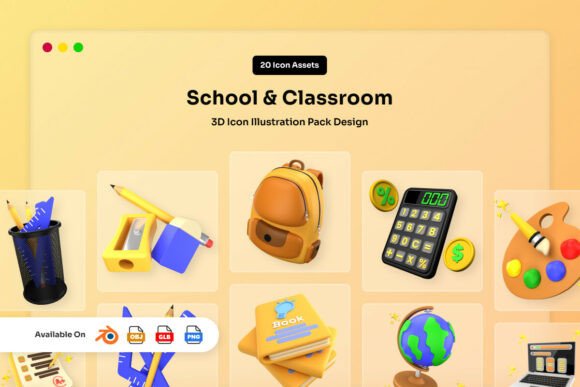
In the landscape of digital content creation, visual consistency is often the difference between a project that feels polished and one that feels disjointed. For professionals working in education technology, instructional design, or educational marketing, finding assets that balance professionalism with approachability is a constant challenge. The School Classroom 3D Icon Pack addresses this specific need by combining playful realism with soft matte textures. These visuals are not merely decorative; they serve as functional tools to communicate academic concepts clearly while maintaining an engaging aesthetic suitable for modern web design, applications, and presentations.
This resource represents more than a collection of images; it is a workflow accelerator designed to streamline the production of educational materials. By offering a cohesive set of twenty unique 3D assets, the pack allows creators to establish a strong visual identity without the time-consuming process of modeling individual objects from scratch. Whether you are building a new learning management system (LMS), designing courseware for adult learners, or creating marketing collateral for a tutoring service, integrating these icons early in your planning phase can significantly reduce production bottlenecks.
Understanding the Visual Language and Design Philosophy
The effectiveness of any icon pack lies in its ability to convey meaning instantly while fitting seamlessly into a broader design system. The School Classroom 3D Icon Pack utilizes smooth rounded forms and balanced lighting to create a warm, approachable feel. This design choice is intentional. In educational contexts, sharp angles and harsh shadows can sometimes subconsciously signal difficulty or rigidity. Conversely, the soft matte textures and rounded geometry found in this pack evoke a sense of safety and creativity, which is essential for environments focused on learning and growth.
For designers and educators, understanding this visual language is crucial when selecting assets. The "playful realism" style bridges the gap between abstract vector illustrations and photorealistic renders. It looks professional enough for corporate training modules yet remains friendly enough for primary education apps. This versatility makes the pack a strategic asset for projects targeting a wide demographic, ranging from kindergarten students to university-level continuing education programs. When implementing these assets, consider how the lighting and texture interact with your existing color palette. The neutral base of the icons ensures they do not clash with brand colors, allowing for easy integration into diverse visual systems.
Integrating Assets into Your Creative Workflow
Successful implementation of the School Classroom 3D Icon Pack begins during the pre-production phase of a project. Before opening your design software, map out where these visual elements will appear. Will they serve as navigation buttons in a mobile app? Will they illustrate key concepts in a slide deck? Or will they be used as standalone hero images for landing pages? Defining these use cases early ensures that you utilize the high-resolution PNG files effectively and plan for scalability.
One of the most significant advantages of this pack is its flexibility within a technical workflow. The inclusion of Blender files (.BLEND) means that the assets are not static. If your project requires a specific color scheme to match a school's branding or a client's corporate identity, you can edit the materials directly in Blender. This capability transforms the icons from fixed resources into customizable components. You can adjust the hue, saturation, and even the roughness of the matte textures to ensure perfect harmony with your background elements.
Furthermore, the well-organized layers within the Blender files facilitate rapid iteration. Instead of rebuilding an object if a slight modification is needed, you can isolate specific parts of the model. This level of control is particularly valuable for teams working under tight deadlines. It reduces the back-and-forth between designers and developers, as the final assets can be tailored precisely to the technical requirements of the platform before export.
Technical Compatibility and File Management
A critical aspect of managing digital assets is ensuring compatibility across different platforms and tools. The School Classroom 3D Icon Pack provides a comprehensive suite of file formats, including OBJ, GLB, and PNG, which covers almost every standard requirement in the industry. Understanding when to use each format is key to maintaining efficiency.
- PNG Files: The 3000 x 3000 pixel high-resolution PNGs with transparent backgrounds are ideal for immediate use in graphic design software like Adobe Photoshop, Illustrator, or Figma. They are perfect for web banners, social media graphics, and print materials where 3D interactivity is not required.
- OBJ and BLEND Files: These formats are essential for 3D workflows. If you are developing a game, an interactive AR experience, or a complex animation, these files allow you to import the models into engines like Unity, Unreal Engine, or Blender. The OBJ format ensures broad compatibility with various 3D viewers and rendering software.
- GLB Files: As the standard for 3D on the web, GLB files are optimized for loading quickly in browsers. If your project involves embedding 3D icons directly into a website using libraries like Three.js or Spline, the included GLB files provide a ready-to-use solution that maintains high quality without compromising page load speed.
Organizing these files correctly from the start prevents confusion later in the project lifecycle. Create a dedicated folder structure that separates source files (Blender/OBJ) from export-ready assets (PNG/GLB). This separation ensures that team members know exactly which version of an asset is appropriate for their specific task, reducing the risk of using low-resolution files in high-definition contexts or vice versa.
Strategic Use Cases for Education and Business
The applications for the School Classroom 3D Icon Pack extend far beyond simple illustration. For entrepreneurs launching ed-tech startups, these icons can define the user interface of a new application. Consistent, high-quality visuals build trust with users, signaling that the product is reliable and professionally developed. When users encounter familiar, well-rendered objects representing books, pencils, globes, or graduation caps, they immediately understand the context of the application.
Educators and instructional designers can leverage these assets to enhance engagement in digital coursework. Static text-heavy slides often lead to cognitive overload. Replacing bullet points with relevant 3D icons breaks up the visual monotony and aids in information retention. For example, using a 3D rendered microscope icon next to a biology lesson summary creates a stronger mental association than a flat clip-art image. The depth and lighting of the 3D assets draw the eye, guiding the learner through the material naturally.
Marketers and content creators also benefit from the "ready-to-use" nature of the pack. In a fast-paced content calendar, having access to twenty unique, high-quality assets allows for rapid campaign deployment. Whether creating social media posts about back-to-school sales, designing email headers for a webinar series, or producing video thumbnails for educational YouTube channels, these icons provide a consistent visual thread that strengthens brand recognition.
Ensuring Long-Term Quality and Consistency
As projects evolve, maintaining visual consistency becomes increasingly important. The School Classroom 3D Icon Pack supports long-term usage by providing a unified style guide in visual form. Because all twenty assets share the same lighting logic, texture finish, and geometric style, they work together harmoniously regardless of how many years pass since their initial download.
Quality control is another factor to consider. The high resolution of the PNG files ensures that the icons remain crisp on retina displays and large-format prints. However, it is good practice to periodically review the assets against current design trends. While the soft matte and rounded style is timeless for education, you may wish to tweak the color palettes in Blender to align with emerging seasonal themes or updated brand guidelines. The editable nature of the source files ensures that the pack remains a viable resource for future projects, protecting your investment in digital assets.
Ultimately, the value of the School Classroom 3D Icon Pack lies in its ability to simplify the creative process without sacrificing quality. By integrating these assets into your workflow, you free up time to focus on strategy, content development, and user experience rather than getting bogged down in asset creation. Whether you are a freelancer managing multiple clients or an educator building a personal curriculum, these tools offer a practical path to professional, engaging, and visually coherent results.